
5 min read
When we announced the Workflow Development Kit (WDK) at Ship AI just over a month ago, we wanted it to reflect our Open SDK Strategy, allowing developers to build with any framework and deploy to any platform.
At launch, WDK supported Next.js and Nitro. Today it works with eight frameworks, including SvelteKit, Astro, Express, and Hono, with TanStack Start and React Router in active development. This post explains the pattern behind those integrations and how they work under the hood.
Link to headingThe pattern behind every WDK integration
On the surface, integrating WDK with Next.js looks nothing like integrating it with Express or SvelteKit. They all have different bundlers, routing systems, and developer experiences. But at its core, every framework integration follows the same two-phase pattern.
Link to headingBuild-time: Generating workflow handlers
The build-time phase compiles your workflow and step functions into executable handler files. It handles bundling, determines where files are output, and applies any framework-specific patches needed for compatibility. This phase also configures hot module replacement, so developers can see workflow changes instantly without restarting their development server.
Link to headingRuntime: Exposing handlers as endpoints
The runtime phase applies workflow client transforms and makes the handler files from the build-time phase accessible by your application's server. Your workflows become reachable via HTTP without any manual endpoint configuration.
How these handlers are exposed as endpoints differs widely between frameworks, but the process is always the same.
Link to headingHow WDK's three transform modes work
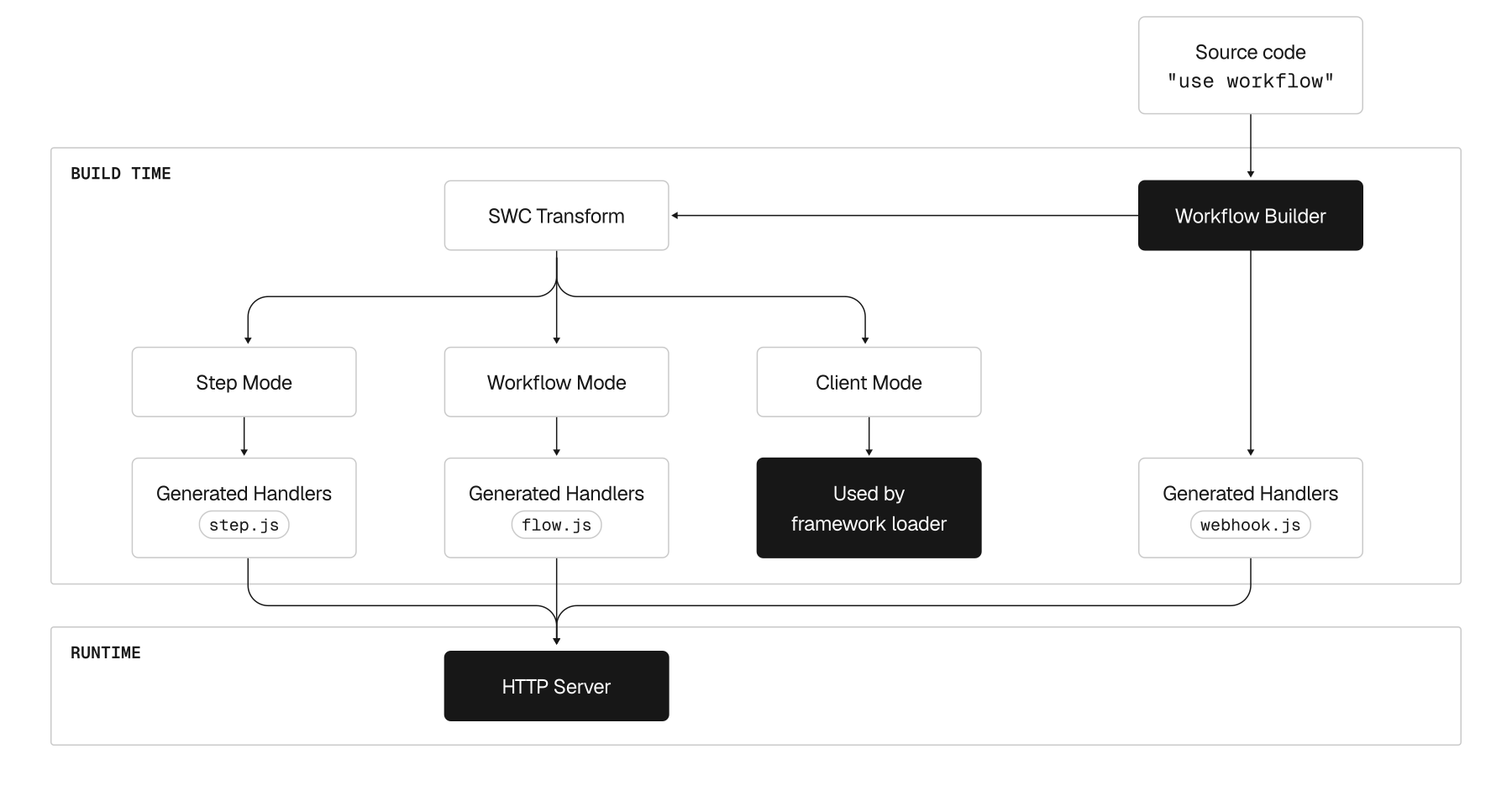
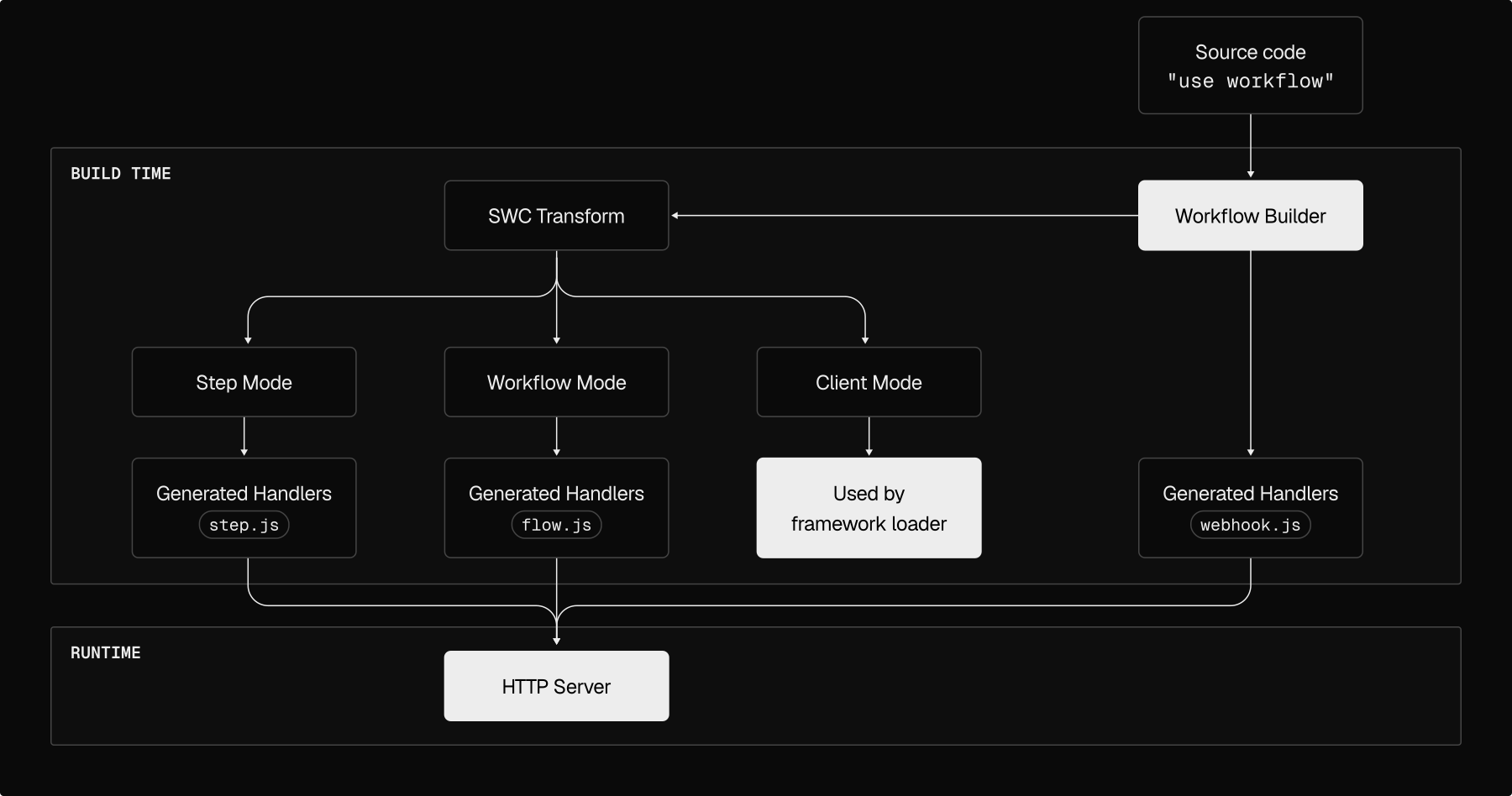
The magic happens in WDK's SWC compiler plugin, which transforms the same input file into three different outputs depending on the mode.
Client mode runs during your framework's build via a Rollup or Vite plugin. It transforms workflow calls into HTTP client code and adds
workflowIdproperties.Step mode runs during WDK's esbuild phase. It transforms
"use step"functions into HTTP handlers that execute your step logic on the server.Workflow mode also runs during esbuild. It transforms
"use workflow"functions into orchestrators that run in a sandboxed virtual environment.
This means you write your code once, and the compiler generates the client, step handler, and workflow handler automatically.
Custom Workflow DevKit Framework Integrations
Create your own Workflow DevKit framework integrations following an in-depth guide.
Learn More
Link to headingA pattern in practice: SvelteKit
To show how this works, let's take a look at the SvelteKit integration. SvelteKit is a framework built on top of Vite with file-based routing. Setting up WDK in a SvelteKit app takes one line.
import { sveltekit } from "@sveltejs/kit/vite";import { workflowPlugin } from "workflow/sveltekit";
export default { plugins: [ sveltekit(), workflowPlugin() ]};That’s all! Behind the scenes, workflowPlugin() implements both phases:
Link to headingBuild-time
Two things happen in parallel.
Client transformation (Vite + Rollup): The
workflowTransformPlugin()from@workflow/rolluphooks into Vite's build and uses SWC withmode: 'client'to transform your imports when you callstart(myWorkflow, [...]), adding anidproperty to workflowsHandler generation (esbuild): The
SvelteKitBuildercreates two bundles (one for steps withmode: 'step'and one for workflows withmode: 'workflow'). These become the+server.jsfiles insrc/routes/.well-known/workflow/v1
Link to headingRuntime
SvelteKit's file-based routing automatically discovers these generated files and exposes them as HTTP endpoints, as long as the file is named +server.js. No manual wiring needed.
This same plugin-based approach works across many Vite-based frameworks. For example, the Astro integration is nearly identical because they share Vite's plugin system, hot module replacement, and file-based routing. The main differences are where routes are output and what framework-specific patches are needed for compatibility.
For frameworks without a bundler like Express or Hono, we use Nitro instead. Nitro is a server toolkit that provides file-based routing, a build system, and other quality-of-life features such as virtual handlers that can be mounted to a server at runtime. This brings the same workflow capabilities to bare HTTP servers.
Link to headingWhy framework request objects required conversion
A challenge that appeared while creating multiple framework integrations was that different frameworks have different opinions on what a "request" looks like. SvelteKit passes a custom request object to route handlers, but our workflow handlers expect the standard Web Request API.
We fixed this by injecting a small converter function into each generated handler.
async function convertSvelteKitRequest(request) { const options = { method: request.method, headers: new Headers(request.headers) }; if (!['GET', 'HEAD'].includes(request.method)) { options.body = await request.arrayBuffer(); }; return new Request(request.url, options);};This helper function is injected into each workflow handler file to be compatible with SvelteKit
Link to headingHot Module Replacement
To ensure developers can iterate to greatness fast, workflow has to support hot module replacement, allowing developers to change workflows and see instant feedback without having to restart their development server.
When you save a workflow file in SvelteKit, three things happen:
Vite's
hotUpdatehook fires with the changed fileWe check for
"use workflow"or"use step"directivesIf found, trigger an esbuild rebuild
async hotUpdate({ file, read }) { const content = await read();
const useWorkflowPattern = /^\s*(['"])use workflow\1;?\s*$/m; const useStepPattern = /^\s*(['"])use step\1;?\s*$/m;
if (!useWorkflowPattern.test(content) && !useStepPattern.test(content)) { return; // Not a workflow file, let Vite handle normally }
await enqueue(() => builder.build()); // Queue rebuild with esbuild: important if concurrent builds ever happen};
A minimal example of Workflow DevKit's HMR in Vite-based frameworks
Link to headingScaling the pattern across frameworks
Building multiple integrations revealed that frameworks fall into two categories.
Link to headingFile-based routing frameworks (Next.js, SvelteKit, Nuxt)
These frameworks make integration straightforward. The build-time phase outputs workflow handler files into framework-specific directories (app/.well-known/workflow/v1 for Next.js, src/routes/.well-known/workflow/v1 for SvelteKit), and the framework automatically discovers them as HTTP endpoints. No manual wiring needed, though each framework requires different patches for how endpoints are defined and handled.
Link to headingHTTP server frameworks (Express, Hono)
These frameworks don't ship with a build system, i.e. they don’t have a bundler, and just expose a bare HTTP server. This is where Nitro comes in. For these frameworks, WDK uses esbuild to bundle workflows, then Nitro mounts them as virtual handlers. At runtime, Nitro wraps your HTTP server and injects the virtual handlers, exposing the workflow endpoints so they're reachable from your HTTP server.
Many modern frameworks are built on top of Vite (SvelteKit, Astro, Nuxt). This meant most of the integration code for plugin registration, HMR configuration, and client transforms was nearly identical across them. We built the core Vite integration once, then adapted it for each framework's specific routing patterns.
Link to headingOpening up workflows to every framework
Building these integrations revealed how framework choice can create unnecessary barriers for adoption. Each integration opened up WDK to an entire developer community that was already committed to their framework of choice.
The SvelteKit integration alone brought workflows to thousands of developers already building in that ecosystem. Rather than forcing teams to migrate to a different framework just for durability, they could add it to their existing stack with a single line in their configuration file.
Working with the community on integrations for Express, Hono, and Astro reinforced this. Developers wanted workflows in their preferred environment, not as a reason to switch environments.
Link to headingThe pattern holds
Since launch, the Workflow DevKit has gained over 1,300 GitHub stars, with developers building workflows across all these frameworks. Building six additional framework integrations demonstrated how good abstractions reveal patterns. What looks like six different problems is really one problem solved six different ways.
The core pattern remains the same across different frameworks. Generate workflow handlers at build-time. Register those handlers as HTTP endpoints at runtime. Only the implementation details change with a few framework-level specifics.
As we continue expanding framework support, that pattern still holds. And for developers, it means they can bring durable workflows to whatever framework they're already using.
Our goal with Workflow DevKit was to make durability a language-level concept across the ecosystem. With these integrations, we're a step closer.
Start Building with Workflow DevKit
Use familiar JavaScript to build workflows that persist across deploys and crashes. No queues, schedulers, or extra infrastructure required.
Get Started